Documentation Index
Fetch the complete documentation index at: https://plivo.com/docs/llms.txt
Use this file to discover all available pages before exploring further.
Overview
This guide shows how to conduct an SMS survey. Surveys can help businesses with market research. Using SMS for surveys lets organizations process input quickly and efficiently.
You can conduct SMS surveys either by using our PHLO visual workflow builder or our APIs. Follow the instructions in one of the tabs below.
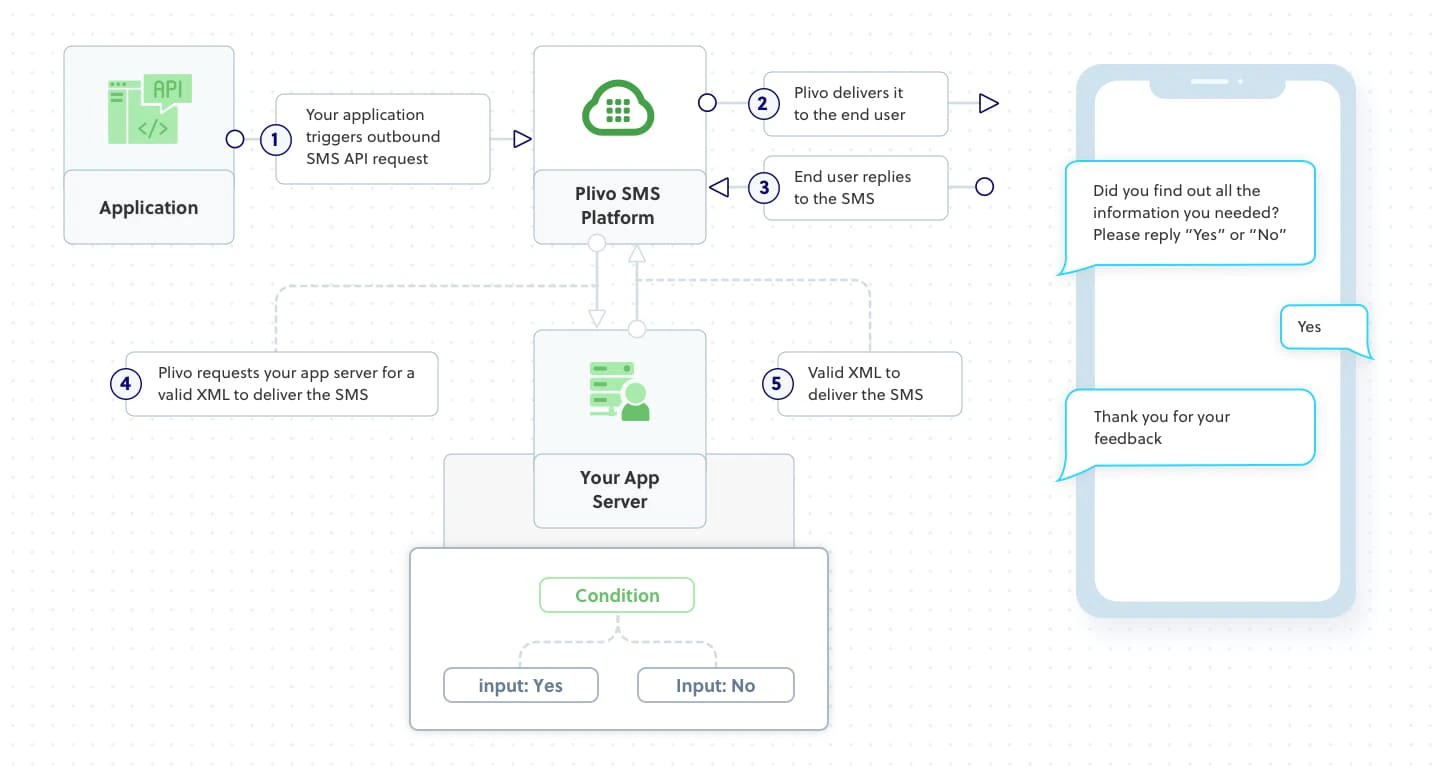
Here’s how to use Plivo APIs to create surveys using SMS text messages — sending questions and collecting answers.How it works
Prerequisites
To get started, you need a Plivo account — sign up with your work email address if you don’t have one already. To receive incoming messages, you must have a Plivo phone number that supports SMS; you can rent numbers from the Numbers page of the Plivo console or by using the Numbers API. If this is your first time using Plivo APIs, follow our instructions to set up a Ruby development environment.Create a Rails controller
Change to the project directory and run this command.$ rails generate controller Plivo sms
$ rm app/views/plivo/sms.html.erb
Create the survey application
Edit app/controllers/plivo_controller.rb and paste into it this code.include Plivo
include Plivo::Exceptions
include Plivo::XML
class PlivoController < ApplicationController
protect_from_forgery with: :null_session # disbale CSRF
def send_survey
api = RestClient.new("<auth_id>","<auth_token>")
response = api.messages.create(
src:'<sender_id>',
dst:'<destination_number>',
text:'Did you find out all the information you needed? Please reply "Yes" or "No"'
)
render json: response.to_s
end
def survey_response
from_number = params[:From]
to_number = params[:To]
text = params[:Text]
puts "From: #{from_number}, To: #{to_number}, Text: #{text}"
if text.downcase == "yes"
message_body = "Thank you for your feedback"
elsif text.downcase=="no"
message_body = "We apologize for the inconvenience. A representative will contact you to assist you"
else
message_body = "Response received was #{text}, which is invalid. Please reply with either Yes or No"
end
response = Response.new
params = {
src: to_number,
dst: from_number,
}
response.addMessage(message_body, params)
xml = PlivoXML.new(response)
puts xml.to_xml
render xml: xml.to_xml
end
end
Add a route
Edit config/routes.rb and change the lineRails.application.routes.draw do
get 'plivo/sms'
end
Rails.application.routes.draw do
  post 'plivo/send_survey/' => 'plivo#send_survey'
  post 'plivo/survey_response/' => 'plivo#survey_response'
end
Test
Save the file and run it.