> ## Documentation Index
> Fetch the complete documentation index at: https://plivo.com/docs/llms.txt
> Use this file to discover all available pages before exploring further.

# Technical Guide: Migrating from Twilio to Plivo

> Migrate your voice app from Twilio to Plivo — API comparison guide

## Introduction

Migrating from Twilio to Plivo is a painless process. The two companies’ API structures, implementation mechanisms, XML structure, SMS message processing, and voice call processing are similar. We wrote this technical comparison between Twilio and Plivo APIs so that you can scope the code changes for a seamless migration.

## Understanding the differences between Twilio and Plivo development

Most of the APIs and features that are available on Twilio are also available on Plivo, and the implementation mechanism is easier as the steps involved are almost identical. This table gives a side-by-side comparison of the two companies’ features and APIs. An added advantage with Plivo is that not only can you code using the familiar API/XML coding method, you can also implement your use cases using {/* [PHLO](/phlo/) */} (Plivo High Level Objects), a visual workflow builder that lets you create workflows by dragging and dropping components onto a canvas — no coding required.

<table>
  <tr>
    <td><strong>Features and APIs</strong></td>
    <td><strong>Twilio</strong></td>
    <td><strong>Plivo</strong></td>
    <td><strong>Similarities</strong></td>
    <td><strong>Implementation Interface</strong></td>
  </tr>

  <tr>
    <td><a href="/voice/">Voice API</a>: Make phone calls</td>
    <td>✅</td>
    <td>✅</td>
    <td>Request and response variables’ structure</td>

    <td>
      API<br />
      PHLO<br />
    </td>
  </tr>

  <tr>
    <td><a href="/docs/voice/concepts/overview#controlling-calls-programmatically">Programmatically manage call flows</a></td>
    <td>Twiml</td>
    <td>Plivo XML</td>
    <td>XML element and its attributes structure</td>

    <td>
      XML<br />
      PHLO<br />
    </td>
  </tr>

  <tr>
    <td><a href="/docs/voice/concepts/geo-permissions/">Geo Permissions</a></td>
    <td>✅</td>
    <td>✅</td>
    <td>Feature parity</td>
    <td>Console</td>
  </tr>

  <tr>
    <td><a href="/lookup/">Number Lookup API</a></td>
    <td>✅</td>
    <td>✅</td>
    <td>API Parity</td>
    <td>API</td>
  </tr>

  <tr>
    <td><a href="/docs/numbers/">Phone number management</a></td>
    <td>✅</td>
    <td>✅</td>
    <td>Feature parity</td>

    <td>
      API<br />
      Console<br />
    </td>
  </tr>

  <tr>
    <td><a href="/voice/call-insights/">Call Insights</a></td>
    <td>✅</td>
    <td>✅</td>
    <td>Feature parity</td>
    <td>Console</td>
  </tr>

  <tr>
    <td><a href="/docs/voice/concepts/signature-validation">Validating Requests</a></td>
    <td>✅</td>
    <td>✅</td>
    <td>Feature parity</td>

    <td>
      API<br />
      XML<br />
    </td>
  </tr>

  <tr>
    <td>Subaccounts</td>
    <td>✅</td>
    <td>✅</td>
    <td>Feature parity</td>
    <td>API</td>
  </tr>

  <tr>
    <td><a href="/docs/voice/use-cases/receive-input/node/#detect-speech-inputs">Speech recognition</a></td>
    <td>✅</td>
    <td>✅</td>
    <td>Feature parity</td>
    <td>XML</td>
  </tr>

  <tr>
    <td><a href="/docs/voice/concepts/ssml/">SSML</a> (Speech Synthesis Markup Language)</td>
    <td>✅</td>
    <td>✅</td>
    <td>Feature parity</td>

    <td>
      XML<br />
      PHLO<br />
    </td>
  </tr>

  <tr>
    <td><a href="/docs/sdk/client/browser/overview">Browser</a>SDKs</td>
    <td>✅</td>
    <td>✅</td>
    <td>Feature parity</td>

    <td>
      <a href="/docs/sdk/client/browser/overview">Browser</a>
    </td>
  </tr>

  <tr>
    <td><a href="/docs/voice/xml/record">Transcription</a></td>
    <td>✅</td>
    <td>✅</td>
    <td>Feature parity</td>

    <td>
      API<br />
      XML<br />
      PHLO<br />
    </td>
  </tr>

  <tr>
    <td><a href="/docs/voice/use-cases/pass-custom-headers#node">Custom SIP Headers</a></td>
    <td>✅</td>
    <td>✅</td>
    <td>Feature parity</td>

    <td>
      API<br />
      XML<br />
      PHLO<br />
      Browser SDK<br />
      Mobile SDKs
    </td>
  </tr>

  <tr>
    <td><a href="/docs/voice/concepts/callbacks/">HTTP callbacks</a></td>
    <td>✅</td>
    <td>✅</td>
    <td>Feature parity</td>

    <td>
      API<br />
      XML<br />
      PHLO<br />
    </td>
  </tr>
</table>

## Create a Plivo account

Start by [signing up for a free trial account](https://cx.plivo.com/signup) that you can use to experiment with and learn about our services. The free trial account comes with free credits, and you can [add more](https://cx.plivo.com/billing/payment-methods) as you go along. You can also [add a phone number](https://cx.plivo.com/phone-numbers) to your account, or [port a number from Twilio to Plivo](/numbers/number-porting/), to start testing the full range of our voice and SMS features. See our [Account Management FAQ](/faq/account/account-management) for details on the signup process.

## Migrate your voice application

To migrate an existing application from Twilio to Plivo using APIs, follow the voice quickstart guides for one of the seven languages Plivo provides SDKs for: [PHP](/messaging/quickstart/php-quickstart/), [Node.js](/messaging/quickstart/node-quickstart/), [C# (.NET)](/messaging/quickstart/dotnet-quickstart/), [Java](/messaging/quickstart/java-quickstart/), [Python](/messaging/quickstart/python-quickstart/), [Ruby](/messaging/quickstart/ruby-quickstart/), and [Go](/messaging/quickstart/go-quickstart/). For another alternative that lets you evaluate Plivo’s SMS APIs and their request and response structure, use our [Postman collections](/voice/quickstart/postman/).

### How to make an outbound call

Let’s take a look at the process of refactoring the code to migrate your app from Twilio to Plivo to set up a simple Python application to make an outbound call by changing just a few lines of code.

<CodeGroup>
  ```py Twilio theme={null}
  import os
  from twilio.rest import Client
  account_sid = os.environ["<twilio_account_sid>"]
  auth_token = os.environ["<twilio_auth_token>"]
  client = Client(account_sid, auth_token)

  call = client.calls.create(
      to='+14155551212',
      from_='+14165553434',
      url='https://demo.twilio.com/docs/voice.xml'
      )

  print(call)
  ```

  ```py Plivo theme={null}
  import os, plivo

  auth_id = os.environ["<plivo_auth_id>"]
  auth_token = os.environ["<plivo_auth_token>"]
  client = plivo.RestClient(auth_id, auth_token)

  call = client.calls.create(
      to_='+14155551212',
      from_='+14165553434',
      answer_url='https://s3.amazonaws.com/static.plivo.com/answer.xml',
    )
  print(call)
  ```
</CodeGroup>

Replace the authentication placeholders with authentication credentials from the Twilio or [Plivo console](https://cx.plivo.com/home).

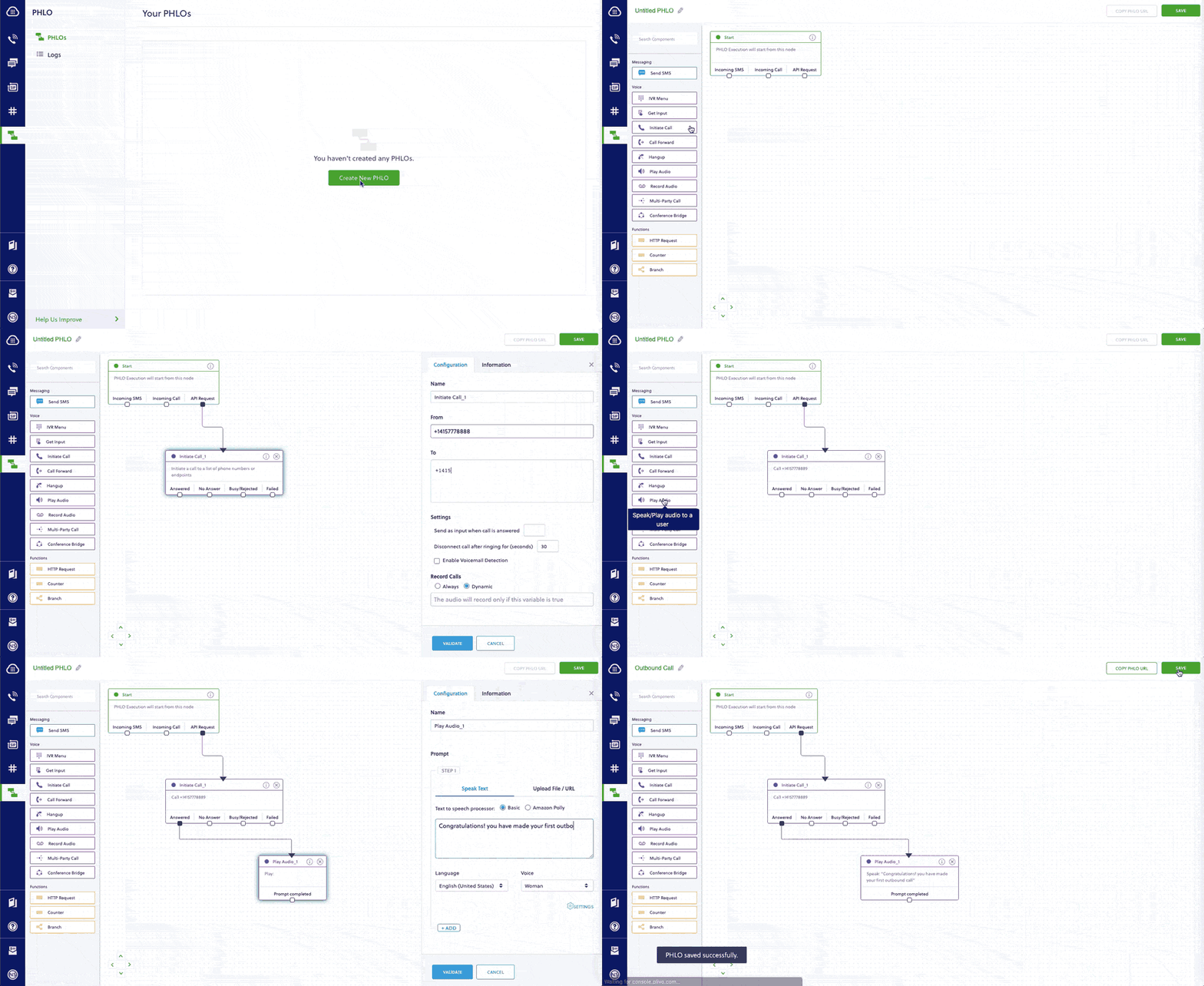
Alternatively, you can implement the same functionality using one of our [PHLO templates](https://cx.plivo.com/agents). To make an outbound call, you can create a PHLO like this:

<Frame>
  <img src="https://mintcdn.com/plivo/GjxgkWYDEc2_LVPj/images/outbound_call_phlo.gif?s=5e8307001ea215f316f3eafe6ac18d86" alt="" width="1024" height="560" data-path="images/outbound_call_phlo.gif" />
</Frame>

### How to receive an incoming call

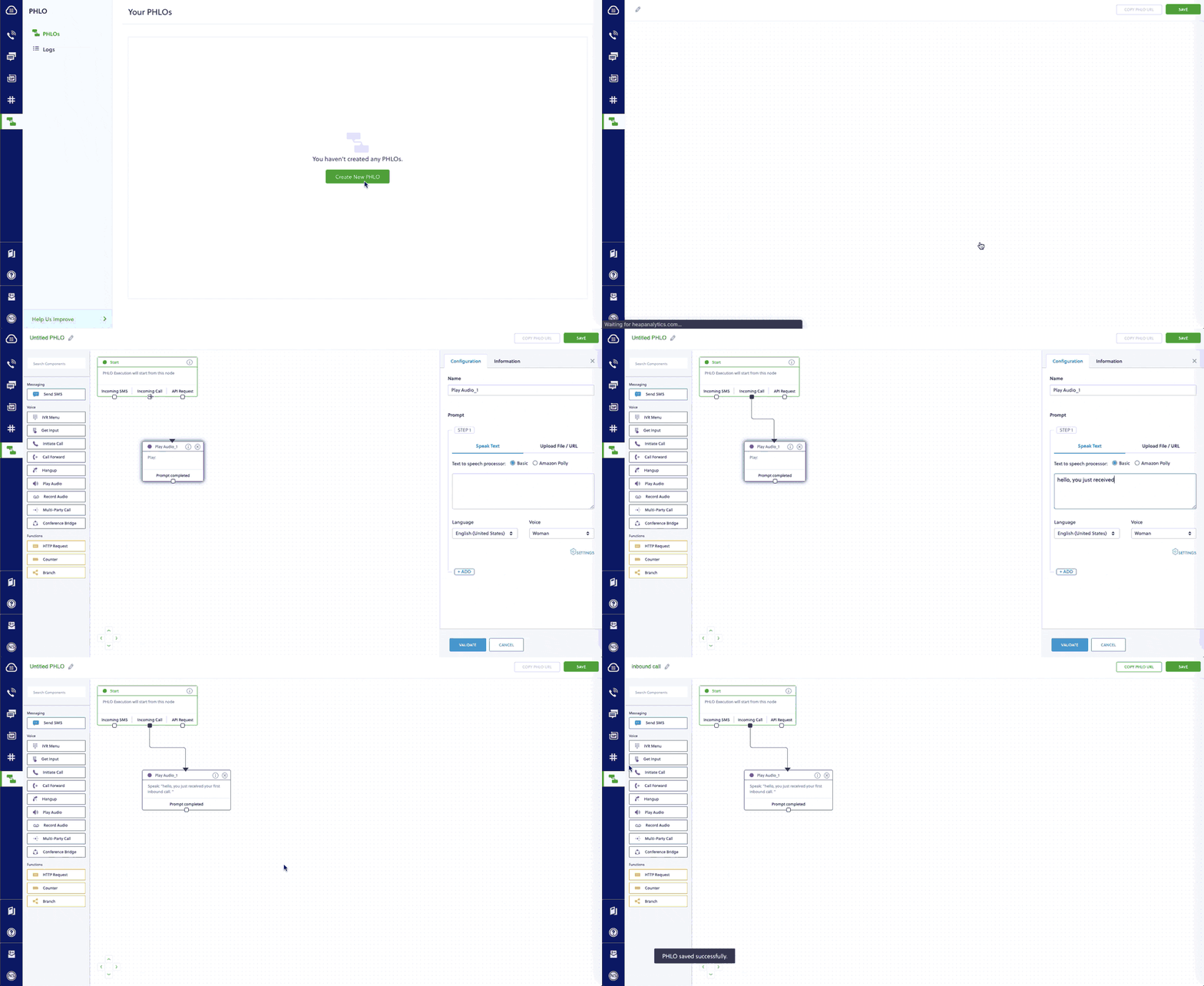
You can migrate an application for receiving and handling an incoming call from Twilio to Plivo just as seamlessly, as in this example:
<CodeGroup>
  ```py Twilio theme={null}
  from flask import Flask
  from twilio.twiml.voice_response import VoiceResponse

  app = Flask(__name__)

  @app.route("/receive_call", methods=['GET', 'POST'])
  def receive_call():
      """Respond to incoming phone calls with a 'Hello world' message"""
      # Start our TwiML response
      resp = VoiceResponse()

      # Read a message aloud to the caller
      resp.say("Hello, world!", voice='alice')
      
      return str(resp)

  if __name__ == "__main__":
      app.run(debug=True)
  ```

  ```py Plivo theme={null}
  from flask import Flask, request, make_response
  from plivo import plivoxml

  app = Flask(__name__)

  @app.route('/receive_call', methods=['GET','POST'])
  def receive_call():
    # Generate a Speak XML element with the details of the text to play on the call
      response = (plivoxml.ResponseElement()
              .add(plivoxml.SpeakElement('Hello, world!')))
      return(response.to_string())

  if __name__ == "__main__":
      app.run(host='0.0.0.0', debug=True)
  ```
</CodeGroup>

Here again you can implement the same functionality using one of our [PHLO templates](https://cx.plivo.com/agents):

<Frame>
  <img src="https://mintcdn.com/plivo/7-odxN9fJG_Dg1dt/images/receive_call-phlo.gif?s=722ef75c0f7d1e9f1578237363ce2c03" alt="" width="1024" height="560" data-path="images/receive_call-phlo.gif" />
</Frame>

### How to forward an incoming call

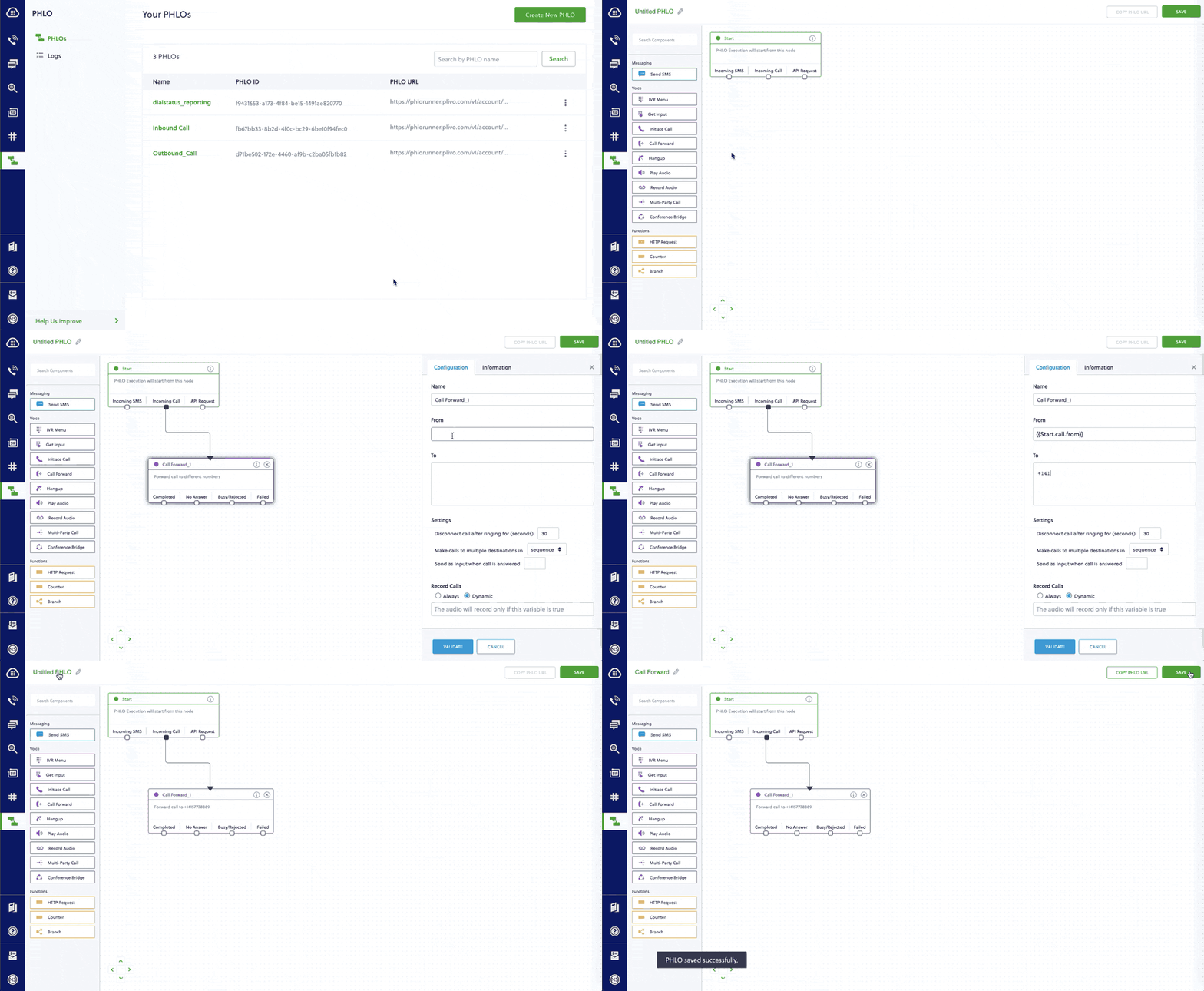
You can migrate an application for forwarding an incoming call from Twilio to Plivo as in this example:
<CodeGroup>
  ```py Twilio theme={null}
  from flask import Flask
  from twilio.twiml.voice_response import Dial, VoiceResponse, Say

  app = Flask(__name__)

  @app.route("/forward_call", methods=['GET', 'POST'])
  def forwardcall():
  """Forward incoming phone call to connect the caller to another party"""

  # Start our TwiML response
  response = VoiceResponse()

  # Dial verb to forward the call
  response.dial('202-555-1234')
  response.say('Goodbye')

  return str(response)

  if __name__ == "__main__":
  app.run(debug=True)
  ```

  ```py Plivo theme={null}
  from flask import Flask, request, make_response
  from plivo import plivoxml

  app = Flask(__name__)

  @app.route('/receive_call', methods=['GET','POST'])
  def receive_call():
    # Generate a Speak XML element with the details of the text to play on the call
      response = (plivoxml.ResponseElement()
              .add(plivoxml.SpeakElement('Hello, world!')))
      return(response.to_string())

  if __name__ == "__main__":
      app.run(host='0.0.0.0', debug=True)
  ```
</CodeGroup>

Here again you can implement the same functionality using one of our [PHLO templates](https://cx.plivo.com/agents):

<Frame>
  <img src="https://mintcdn.com/plivo/EvRfP72Bjs4tuRt5/images/callforward.gif?s=39071675cedff1caa814bef3d4284b30" alt="" width="1024" height="562" data-path="images/callforward.gif" />
</Frame>

For more information about migrating your voice applications to Plivo, check out our [detailed use case guides](/voice/use-cases/make-outbound-calls/node/), available for all seven programming languages and PHLO.

### More use cases

You can migrate applications that serve other use cases too:

* [Phone system IVR — Touch-Tone/DTMF-based virtual assistant](/voice/use-cases/ivr#node)
* [Voice-controlled virtual assistant](/voice/use-cases/receive-input/node/#detect-speech-inputs)
* [Number masking](/voice/use-cases/number-masking/node/)
* [Supervisor coaching](/voice/use-cases/supervisor-coaching/node/)
* [PINless conference](/voice/use-cases/call-conference#node)
* [Conference with PIN](/voice/use-cases/conference-with-pin#node)
* [Voicemail](/voice/use-cases/voicemail#node)
* [Voice alerts broadcasting](/voice/use-cases/voice-broadcasting#node)
* [Voice survey](/voice/use-cases/voice-survey#node)
* [Dial status reporting](/voice/use-cases/dial-status-reporting#node)
* [Screen incoming calls](/voice/use-cases/screen-incoming-calls#node)
* [Record a call](/voice/use-cases/screen-incoming-calls#node)

## Port your existing numbers from Twilio to Plivo

If you want to continue using your phone numbers from Twilio, you can port the numbers to Plivo without having any downtime on your services for your customers. Phone number porting must be requested by a phone number’s owner. Here’s an overview of the process for porting a phone number to Plivo:

1. Phone number’s owner submits porting request with documentation.
2. Plivo verifies the porting request.
3. Plivo submits porting request to the gaining carrier.
4. The gaining carrier submits porting request to the losing carrier.
5. The losing carrier responds with an approval or a rejection.
6. Plivo notifies phone number owner of Firm Order Commitment or porting date.

You can check our [number porting guide](/numbers/number-porting/) to initiate the process.

## Rent new phone numbers for your migrated app

You can rent new phone numbers on the Plivo platform for your migrated applications as well. Plivo provides a self-serve [console](https://cx.plivo.com/phone-numbers) to rent new numbers and to manage them. You can also use the [Phone Numbers API](/numbers/api/overview/) for number management. Our [Phone Numbers quickstart guide](/numbers/guides/buy-a-number/) provides more information.