> ## Documentation Index
> Fetch the complete documentation index at: https://plivo.com/docs/llms.txt
> Use this file to discover all available pages before exploring further.
# Verified Caller ID
> Use your own phone numbers as outbound caller IDs after verification
* **What:** Verify ownership of your own phone numbers via OTP (SMS or voice call), then use them as outbound caller IDs
* **How:** Initiate verification via [API](/voice/api/verified-caller-ids) or Console (**Voice > Verified Caller ID**), receive and confirm OTP
* **Limitation:** Primarily US only. Not reliably supported internationally due to local carrier restrictions
* **India:** Not supported. You must use a Plivo-rented Indian number as caller ID per local regulations
Plivo's Verified Caller ID feature allows customers to use their own numbers as outbound caller IDs after verification.
Simply register the number you wish to use for outbound calls with Verified Caller ID. Plivo will send a one-time password (OTP) to the designated number through your preferred channel—SMS or voice. Once successfully authenticated, your number will be added to the verified caller ID list and can be used as the caller ID for making outbound calls.
There are two ways to verify your number: through the [Plivo console](https://cx.plivo.com/phone-numbers?tab=caller-id) or using Plivo's REST APIs or SDKs.
**International Limitations**
Verified Caller ID is primarily designed for US compliance. Due to local regulations:
* **India:** Not applicable. Indian regulations require using Plivo-rented Indian numbers as caller ID.
* **Other countries:** May not work reliably due to carrier restrictions and local regulations.
**Recommendation:** For reliable caller ID display, use a [Plivo-rented phone number](/numbers/phone-numbers#buy-a-phone-number) in the destination country.
***
## Why should you verify a caller ID?
The rise of call spoofing poses a significant challenge for businesses globally. This fraudulent practice uses technology to mimic calls from local numbers, reputable companies, government agencies, or genuine contacts.
Plivo's Verified Caller ID, designed to combat call spoofing, strengthens outbound call credibility by ensuring number verification before their utilization as the outbound caller ID.
## Verify your caller ID using Plivo’s APIs
Initiate the verification process using Plivo’s Verified Caller APIs/SDK according to the guides linked below. Plivo will initiate the OTP through the channel you select.
### Code
```py Python theme={null}
import plivo
client = plivo.RestClient('', '')
response = client.verify_callerids.initiate_verify(phone_number='',
alias='',
channel='call/sms',
subaccount='')
print(response)
```
```rb Ruby theme={null}
require 'rubygems'
require 'plivo'
include Plivo
include Plivo::Exceptions
api = RestClient.new("", "")
begin
response = api.verify_caller_id.initiate(
phone_number="91XXXXXXXXXX", channel="sms", alias_ = "test",subaccount=""
)
puts response
rescue PlivoRESTError => e
puts 'Exception: ' + e.message
end
```
```js Node.js theme={null}
var plivo = require('plivo');
(function main() {
'use strict';
var client = new plivo.Client("","");
client.verify.initiate('',{
channel : '',
alias : '',
subAccount : ''
}).then(function(response) {
console.log(response);
}, function (err) {
console.error(err);
});
})();
```
```php PHP theme={null}
","");
try {
$response = $client->verifyCallerId->initiate("+91XXXXXXXXX", [
"alias" => "test",
"subaccount" => "",
"channel" => "Call"
]);
print_r($response);
}
catch (PlivoRestException $ex) {
print_r($ex);
}
```
```java Java theme={null}
package com.plivo.examples;
import com.plivo.api.Plivo;
import com.plivo.api.exceptions.PlivoRestException;
import com.plivo.api.models.verify.InitiateVerifyResponse;
import com.plivo.api.models.verify.Verify;
import java.io.IOException;
public class verificationCallerID {
public static void main(String[] args) {
Plivo.init("", "");
try {
InitiateVerifyResponse response = Verify.initiateVerify().phoneNumber("91XXXXXXXXXX").alias("test").channel("call").create();
System.out.println(response);
} catch (PlivoRestException | IOException e) {
e.printStackTrace();
}
}
}
```
```Go Go theme={null}
package main
import (
"fmt"
"github.com/plivo/plivo-go/v7"
)
func main() {
client, err := plivo.NewClient("", "", &plivo.ClientOptions{})
if err != nil {
fmt.Print("Error", err.Error())
return
}
response, err := client.VerifyCallerId.InitiateVerify(plivo.InitiateVerify{PhoneNumber: "", Alias: "", Channel : "", SubAccount: ""})
if err != nil {
fmt.Print("Error", err.Error())
return
}
fmt.Printf("Response: %#v\n", response)
```
```cs .NET theme={null}
using System;
using System.Collections.Generic;
using Plivo;
using Plivo.Exception;
namespace PlivoExamples
{
internal class Program
{
public static void Main(string[] args)
{
var api = new PlivoApi("","");
try
{
var response = api.VerifyCallerId.Initiate("", "", "","");
Console.WriteLine(response);
}
catch (PlivoRestException e)
{
Console.WriteLine("Exception: " + e.Message);
Console.WriteLine("Exception: " + e);
}
}
}
}
```
```sh Curl theme={null}
curl -i --user AUTH_ID:AUTH_TOKEN \
-H "Content-Type: application/json" \
-d '{"phone_number": "+12025551XXX","alias":"US Mainland"}' \
https://api.plivo.com/v1/Account/{auth_id}/VerifiedCallerId/
```
## Verify your one-time passcode (OTP) via API
As part of the caller ID verification process, you will need to confirm your phone number by receiving an OTP. Follow the guides linked below to verify your OTP using APIs and SDK. Once the OTP is confirmed, you can use the verified number as a caller ID.
### Code
```py Python theme={null}
import plivo
client = plivo.RestClient('', '')
response = client.verify_callerids.verify_caller_id(verification_uuid="68dea750-5a76-485d-8ac3-5cf5996ba2fb",otp="123456")
print(response)
```
```rb Ruby theme={null}
require 'rubygems'
require 'plivo'
include Plivo
include Plivo::Exceptions
api = RestClient.new("", "")
begin
response = api.verify_caller_id.verify("", "")
puts response
rescue PlivoRESTError => e
puts 'Exception: ' + e.message
```
```js Node.js theme={null}
var plivo = require('plivo');
(function main() {
'use strict';
var client = new plivo.Client("","");
client.verify.verify("","").then(function(response) {
console.log(response);
}, function (err) {
console.error(err);
});
})();
```
```php PHP theme={null}
","");
try {
$response = $client->verifyCallerId->verify("","");
print_r($response);
}
catch (PlivoRestException $ex) {
print_r($ex);
}
```
```java Java theme={null}
package com.plivo.examples;
import com.plivo.api.Plivo;
import com.plivo.api.exceptions.PlivoRestException;
import com.plivo.api.models.verify.InitiateVerifyResponse;
import com.plivo.api.models.verify.Verify;
import java.io.IOException;
public class verificationCallerID {
try{
VerifyCallerIdResponse response = Verify.verifyCallerId("2dfd42e2-431d-4bf6-bc70-d3971ffae240").otp("277407").create();
System.out.println(response);
}catch(PlivoRestException | IOException e){
e.printStackTrace();
}
}
}
```
```go Go theme={null}
package main
import (
"fmt"
"github.com/plivo/plivo-go/v7"
)
func main() {
client, err := plivo.NewClient("", "", &plivo.ClientOptions{})
if err != nil {
fmt.Print("Error", err.Error())
return
}
response, err := client.VerifyCallerId.VerifyCallerID("","123456")
if err != nil {
fmt.Print("Error", err.Error())
return
}
fmt.Printf("Response: %#v\n", response)
```
```cs .NET theme={null}
using System;
using System.Collections.Generic;
using Plivo;
using Plivo.Exception;
namespace PlivoExamples
{
internal class Program
{
public static void Main(string[] args)
{
var api = new PlivoApi("","");
try
{
var response = api.VerifyCallerId.Verify("", "");
Console.WriteLine(response);
}
catch (PlivoRestException e)
{
Console.WriteLine("Exception: " + e.Message);
Console.WriteLine("Exception: " + e);
}
}
}
}
```
```sh Curl theme={null}
curl -i --user AUTH_ID:AUTH_TOKEN \
-H "Content-Type: application/json" \
-d '{"otp": "7871"}' \
https://api.plivo.com/v1/Account/{auth_id}/VerifiedCallerId/Verification/f87836bd-f3c0-41bb-9498-125e6faaa4d4/
```
## Verify your caller ID using the Plivo console
You can verify your caller ID on the Plivo console by taking the following steps.
1. Log in to the Plivo console.
2. Go to Voice → Verified Caller ID.
3. Choose "Verify Your First Number."
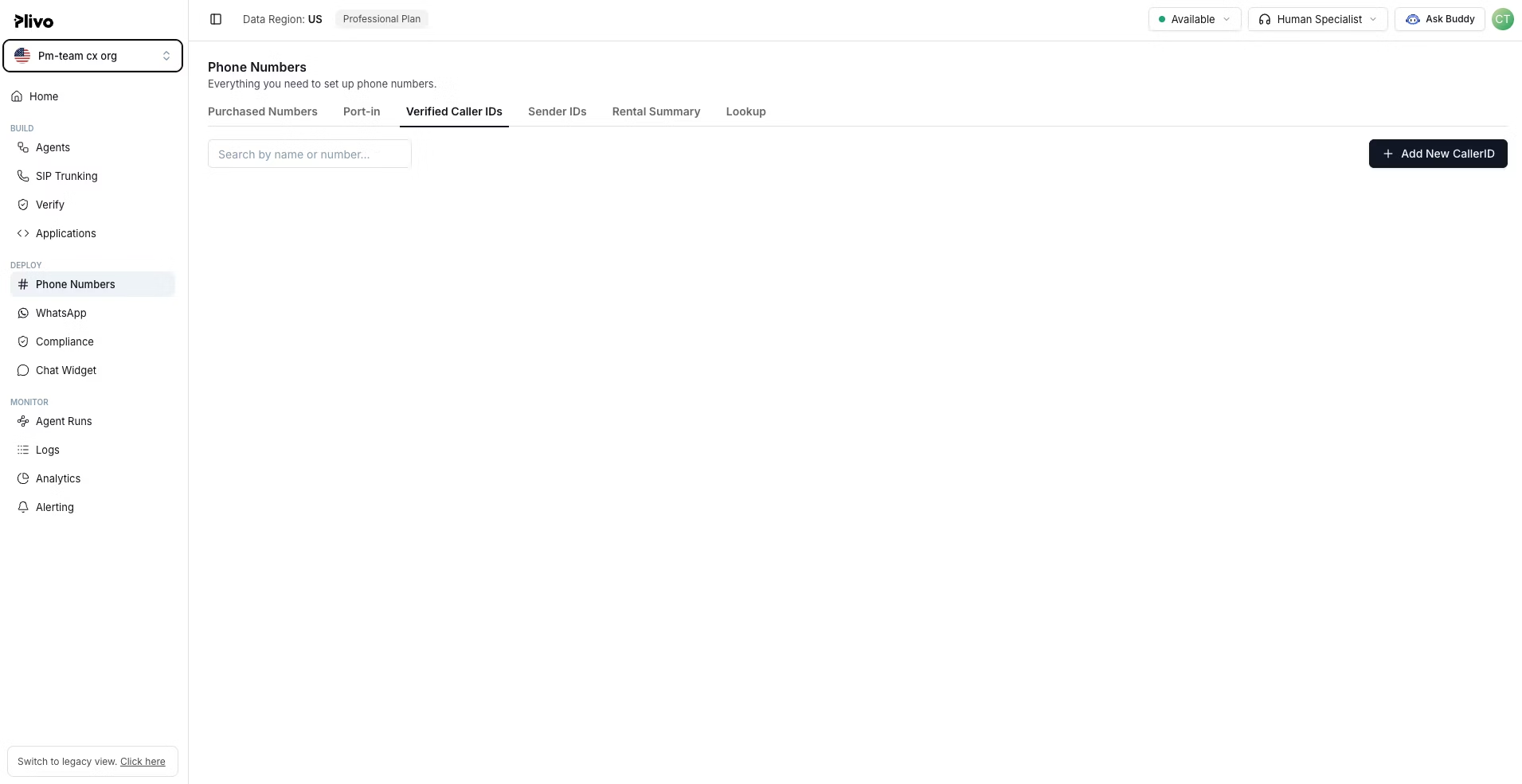 4. Enter the alias name, the number requiring verification, and the verification method. If you're a reseller verifying for your client, select the sub-account.
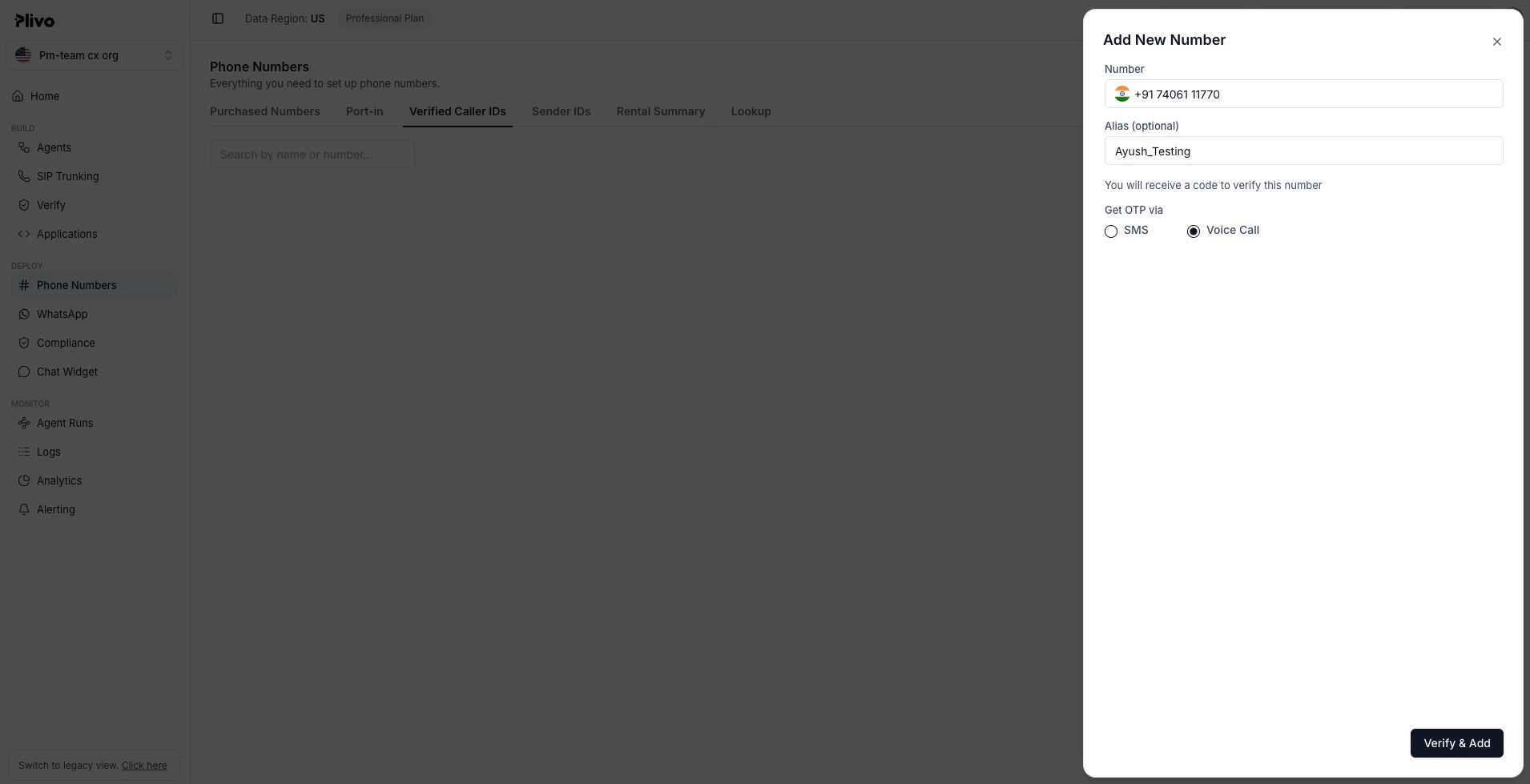 5. After selecting "Request Verification Code," you'll receive the code via SMS or voice, depending on the method you selected.
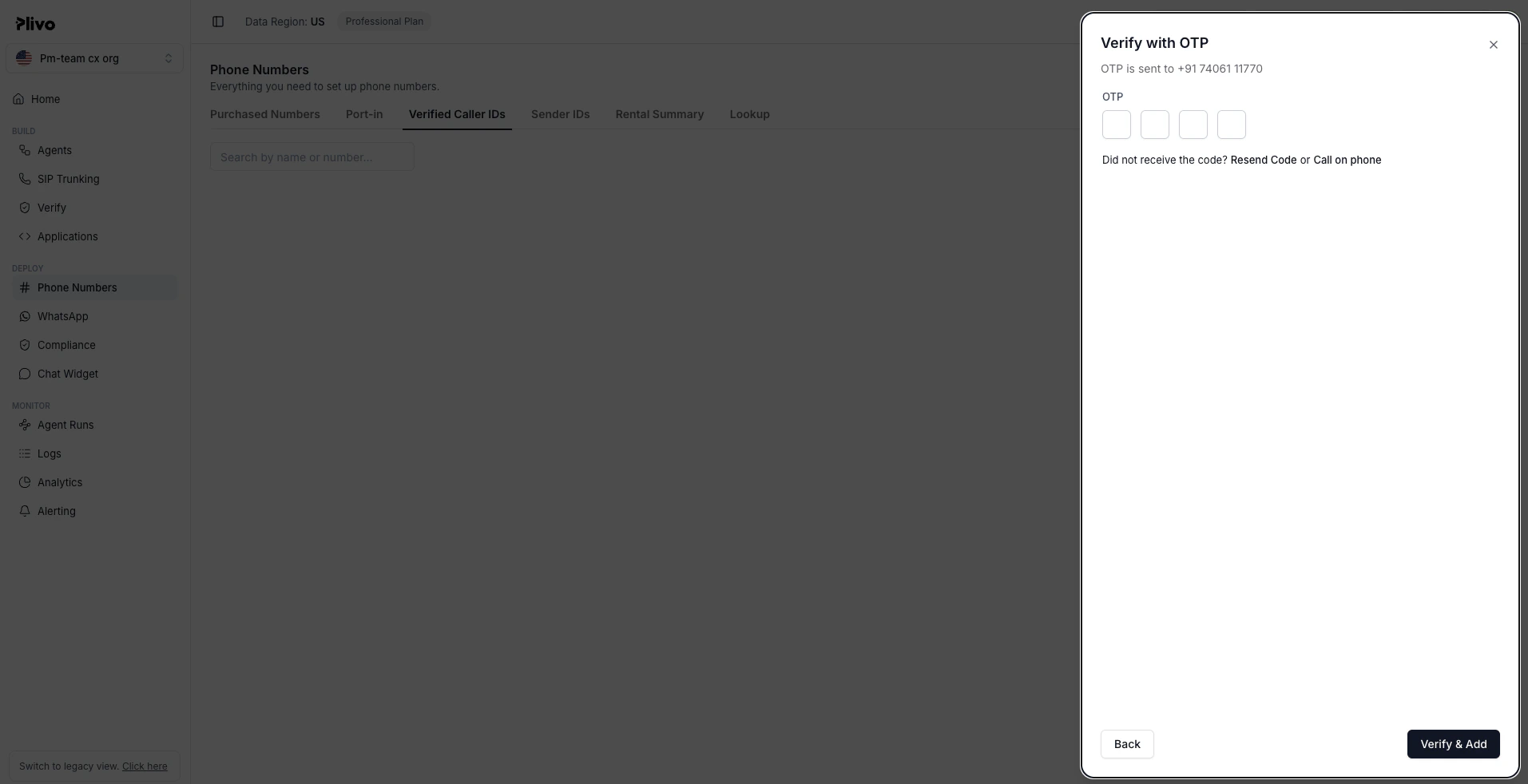 6. Upon successful verification, your number will be added to the Verified Caller ID list. You can then use the verified number as a caller ID to place outbound calls.