> ## Documentation Index
> Fetch the complete documentation index at: https://plivo.com/docs/llms.txt
> Use this file to discover all available pages before exploring further.
# Plivo iOS SDK
> Build iOS calling apps — PushKit, CallKit, and WebRTC integration
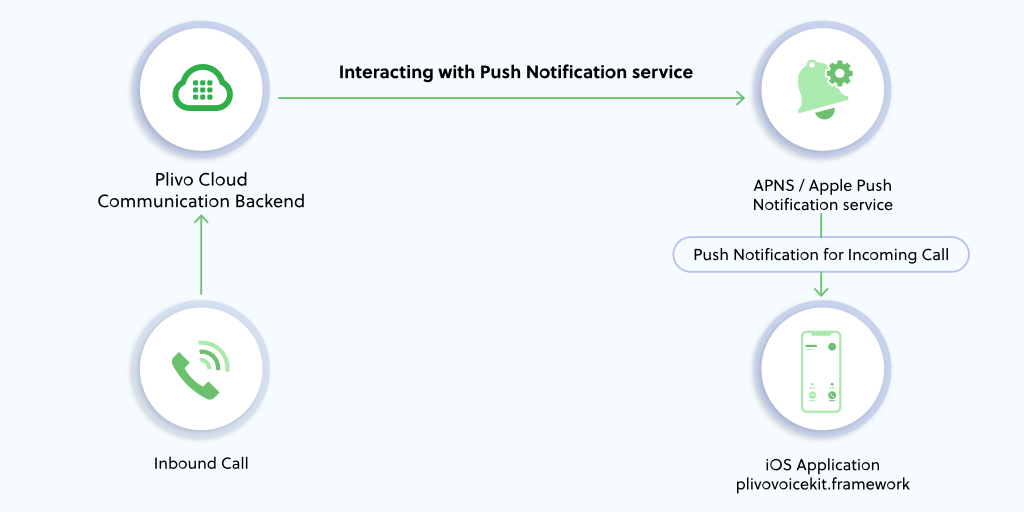
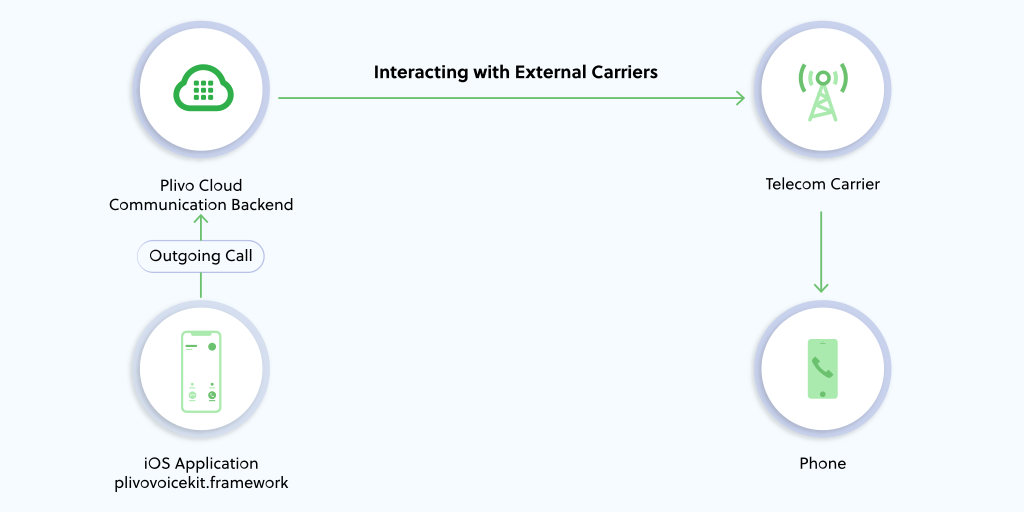
The Plivo iOS SDK v2 allows you to make outgoing and receive incoming calls in your iOS application. It supports Pushkit and Callkit, hence eliminating the need for persistent connections to receive incoming calls. The SDK currently supports iOS versions 8 and above, including iOS 12. It supports both IPv4, IPv6 networks for performing inbound and outbound calls.
#### Incoming Voice Call
 #### Outgoing Voice Call
 ## Prerequisites
1. [Register](https://cx.plivo.com/signup) for a Plivo account. You need a Plivo account to create endpoints and PHLO.
2. Plivo Endpoint: An endpoint facilitates making and receiving calls from the iOS client. For more information on what an endpoint is and where it can be used, see [the endpoint tutorial](/voice/concepts/sip-endpoint/). Create an endpoint as required. You can automate the creation of endpoints if required using our REST API. Please refer to our [API documentation for endpoint](/voice/api/endpoint/) for more details.
3. Xcode IDE: Download the latest version of Xcode IDE from [https://developer.apple.com/xcode/ide/](https://developer.apple.com/xcode/ide/)
4. Apple Developers certificate: It is required for testing the app on an actual device. You do not need the certificate if you plan to test the application on a simulator.
5. PHLO: Plivo High-Level Object (PHLO) is a collaborative way of building and deploying apps visually. You must create a [PHLO](/sdk/client/ios/v2/phlo-to-endpoint/) and link it with your endpoint.
## Prerequisites
1. [Register](https://cx.plivo.com/signup) for a Plivo account. You need a Plivo account to create endpoints and PHLO.
2. Plivo Endpoint: An endpoint facilitates making and receiving calls from the iOS client. For more information on what an endpoint is and where it can be used, see [the endpoint tutorial](/voice/concepts/sip-endpoint/). Create an endpoint as required. You can automate the creation of endpoints if required using our REST API. Please refer to our [API documentation for endpoint](/voice/api/endpoint/) for more details.
3. Xcode IDE: Download the latest version of Xcode IDE from [https://developer.apple.com/xcode/ide/](https://developer.apple.com/xcode/ide/)
4. Apple Developers certificate: It is required for testing the app on an actual device. You do not need the certificate if you plan to test the application on a simulator.
5. PHLO: Plivo High-Level Object (PHLO) is a collaborative way of building and deploying apps visually. You must create a [PHLO](/sdk/client/ios/v2/phlo-to-endpoint/) and link it with your endpoint.
## Getting started
To create a VoIP enabled iOS app
1. Install [Cocoapods](https://cocoapods.org/pods/PlivoVoiceKit) and add the PlivoVoiceKit framework.
2. Use our [iOS quickstart Application](https://github.com/plivo/plivo-ios-quickstart-app) as a starting point to create your app.
3. Refer to [iOS SDK reference](/sdk/client/ios/reference/) for more information on creating applications capable of making and receiving calls in your iOS app.
4. To set up incoming calls with push notifications, see [Setting up Push credentials](/sdk/client/concepts/mobile/setting-up-push-credentials/).
5. Manage Apple Push credentials on the console, see [Manage Push Credentials](/sdk/client/concepts/mobile/manage-push-credentials/).
6. Use our [Best practices guide](/sdk/client/concepts/mobile/best-practices/) to build the iOS app efficiently.
7. To debug the basic call related issues, see [Troubleshooting guide](/sdk/client/troubleshooting-guide/)
## Resources
1. [Create applications capable of making and receiving calls in your iOS app using Cocoapods](https://cocoapods.org/pods/PlivoVoiceKit)
2. [Make outgoing and receive incoming calls in your iOS application using our quickstart example app](https://github.com/plivo/plivo-ios-quickstart-app)
3. [Download the latest Plivo iOS SDK package](https://helpers.plivo.com/ios/plivo-ios-package-2.0.zip)
4. [Create applications capable of making and receiving calls in your iOS app using our iOS SDK Reference](/sdk/client/ios/reference/)
5. [Receive incoming calls on the Plivo iOS SDK v2 using pushkit](/sdk/client/concepts/mobile/setting-up-push-credentials/)
6. [Managing Endpoint calls using PHLO](/sdk/client/ios/v2/phlo-to-endpoint/)