> ## Documentation Index
> Fetch the complete documentation index at: https://plivo.com/docs/llms.txt
> Use this file to discover all available pages before exploring further.
# How it works
> Understand the XML request-response flow for incoming SMS handling
Let’s look at an example to see how Plivo XML works. Consider a use case where you want to reply to an incoming SMS message.
This diagram outlines the message flow for a typical case where XML is used:
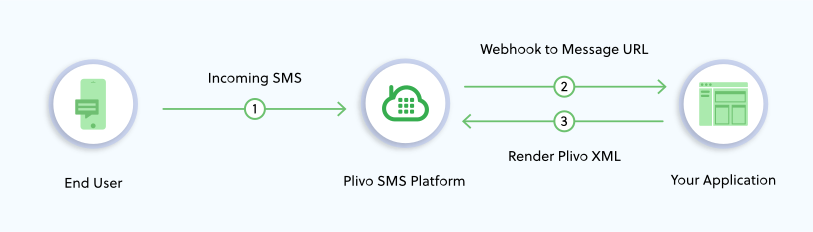 An incoming SMS message is received on a Plivo number and is connected through the Plivo SMS Platform. Plivo then looks up the `message_url` configured for the Application that’s linked to the Plivo number and makes a request to that URL. Your web application at that URL should return an XML document that provides instructions to the Plivo API on how the SMS message should be handled. In this case, it should return a message XML document to reply to the incoming SMS message.
In this example, Plivo works like an HTTP client that receives a message and and makes a request to your web application for instructions on how to handle the message. By default, XML requests to your application are made via `POST`, but you can configure Plivo to make XML requests to your application via HTTP `GET` or `POST` methods by changing the related configuration parameter.
You can set configuration parameters when sending out a message. To deal with incoming messages, Plivo uses the configuration attached to the application that’s linked to the phone number on which your incoming message is received.
An incoming SMS message is received on a Plivo number and is connected through the Plivo SMS Platform. Plivo then looks up the `message_url` configured for the Application that’s linked to the Plivo number and makes a request to that URL. Your web application at that URL should return an XML document that provides instructions to the Plivo API on how the SMS message should be handled. In this case, it should return a message XML document to reply to the incoming SMS message.
In this example, Plivo works like an HTTP client that receives a message and and makes a request to your web application for instructions on how to handle the message. By default, XML requests to your application are made via `POST`, but you can configure Plivo to make XML requests to your application via HTTP `GET` or `POST` methods by changing the related configuration parameter.
You can set configuration parameters when sending out a message. To deal with incoming messages, Plivo uses the configuration attached to the application that’s linked to the phone number on which your incoming message is received.