> ## Documentation Index
> Fetch the complete documentation index at: https://plivo.com/docs/llms.txt
> Use this file to discover all available pages before exploring further.
# SMS Data Redaction
> Redact SMS message content and phone numbers for GDPR compliance
Data privacy is a key concern for every organization that processes third-party personal data, including phone numbers. With the [GDPR](https://www.plivo.com/blog/) now in effect, data privacy holds more importance today than ever.
Plivo provides SMS redaction features to customers interested in limiting how their outbound and inbound SMS usage data is retained on Plivo’s servers and databases.
## Outbound SMS redaction
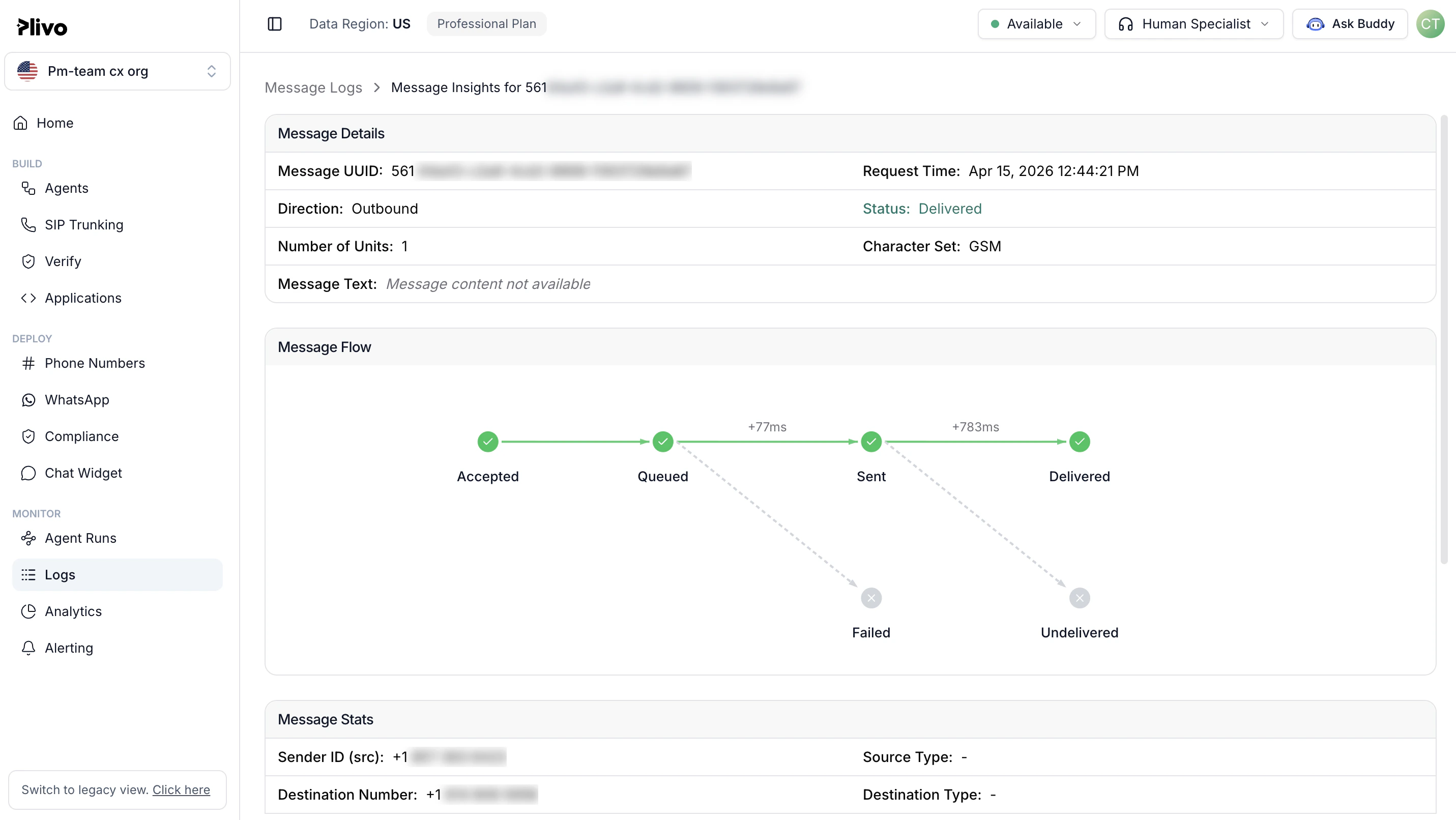
When outbound SMS message redaction is enabled:
* The last three digits of the destination number are redacted (replaced with \*\*\*).
* The actual message content is redacted and replaced with \*\*\*Text Content Redacted\*\*\*.
* Redaction is applied on
* Server logs
* Console debug logs
* Console debug UI
* Customer callbacks
#### Console logs UI
 ## How to enable outbound SMS and MMS redaction
Plivo offers a simple way to redact the content and destination number of an outbound SMS or MMS message. Set the log request parameter of the [Send SMS API](/messaging/api/message#send-a-message) request to `false`. The default value is `true`: outbound messages are not redacted unless the log request parameter is explicitly set to `false`.
We also support partial redaction of your messaging data. To enable partial redaction,
* set the log request parameter of the Send SMS API request to content\_only to log message content and redact the phone numbers; or,
* set the log request parameter of the Send SMS API request to number\_only to log phone number data and redact the message content.
Please note that if the redaction is enabled, Plivo cannot debug or recover the message content if there are any issues.
#### Code samples
```py Python theme={null}
import plivo
client = plivo.RestClient('', '')
response = client.messages.create(
src ='14092102231', # Sender's phone number with country code
dst ='19177220741', # Receiver's phone Number with country code
text ='hello, test message!',
log = False)
print(response)
# print str(resp)
```
```Ruby Ruby theme={null}
require "plivo"
include Plivo
api = RestClient.new("", "")
response = api.messages.create(
src:"",
dst:"",
text:"Hello, this is a sample text",
url: "https://.com/sms_status/",
log:false
)
puts response
```
```Node.js Node.js theme={null}
// Example for Message create
var plivo = require('plivo');
(function main() {
'use strict';
// If auth id and auth token are not specified, Plivo will fetch them from the environment variables.
var client = new plivo.Client("", "");
client.messages.create({
src: "14092102231",
dst: "19177220741",
text: "hello, test message!",
log: 'false'
}).then(function(response) {
console.log(response);
}, function(err) {
console.error(err);
});
})();
```
```PHP PHP theme={null}
","");
try {
$response = $client->messages->create(
[
"src" => "+12025550000",
"dst" => "+12025551111",
"text" =>"Hello, this is a sample text",
"url"=>"https://.com/sms_status/",
"log"=> "false"
]
);
print_r($response);
}
catch (PlivoRestException $ex) {
print_r($ex);
}
```
```Java Java theme={null}
package com.plivo.api.samples.message;
import java.io.IOException;
import java.util.Collections;
import com.plivo.api.Plivo;
import com.plivo.api.exceptions.PlivoRestException;
import com.plivo.api.models.message.Message;
import com.plivo.api.models.message.MessageCreateResponse;
/**
* Example for Message create
*/
class Example {
public static void main(String [] args) {
Plivo.init("","");
try {
MessageCreateResponse response = Message.creator("14092102231", Collections.singletonList("19177220741"), "hello, test message!" ).log(false)
.create();
System.out.println(response);
} catch (PlivoRestException | IOException e) {
e.printStackTrace();
}
}
}
```
```Go Go theme={null}
// Example for Message create
package main
import (
"fmt"
"github.com/plivo/plivo-go/v7"
)
func main() {
client, err := plivo.NewClient("", "", &plivo.ClientOptions{})
if err != nil {
fmt.Print("Error", err.Error())
return
}
response, err := client.Messages.Create(
plivo.MessageCreateParams{
Src: "14092102231",
Dst: "19177220741",
Text: "hello, test message!",
Log: "false",
},
)
if err != nil {
fmt.Print("Error", err.Error())
return
}
fmt.Printf("Response: %#v\n", response)
}
```
```.NET .NET theme={null}
using System;
using System.Collections.Generic;
using Plivo;
using Plivo.Exception;
namespace Send_Sms
{
class Program
{
public static void Main(string[] args)
{
var api = new PlivoApi("","");
try
{
var response = api.Message.Create(
src: "14092102231",
dst: new List { "19177220741" },
text: "hello, test message!",
log: false
);
Console.WriteLine(response);
}
catch (PlivoRestException e)
{
Console.WriteLine("Exception: " + e.Message);
}
}
}
}
```
```sh Curl theme={null}
curl -i --user : \
-H "Content-Type: application/json" \
-d '{"src": "14092102231","dst": "19177220741", "text": "hello, test message!", "log": "false"}' \
https://api.plivo.com/v1/Account/{AUTH_ID}/Message/
```
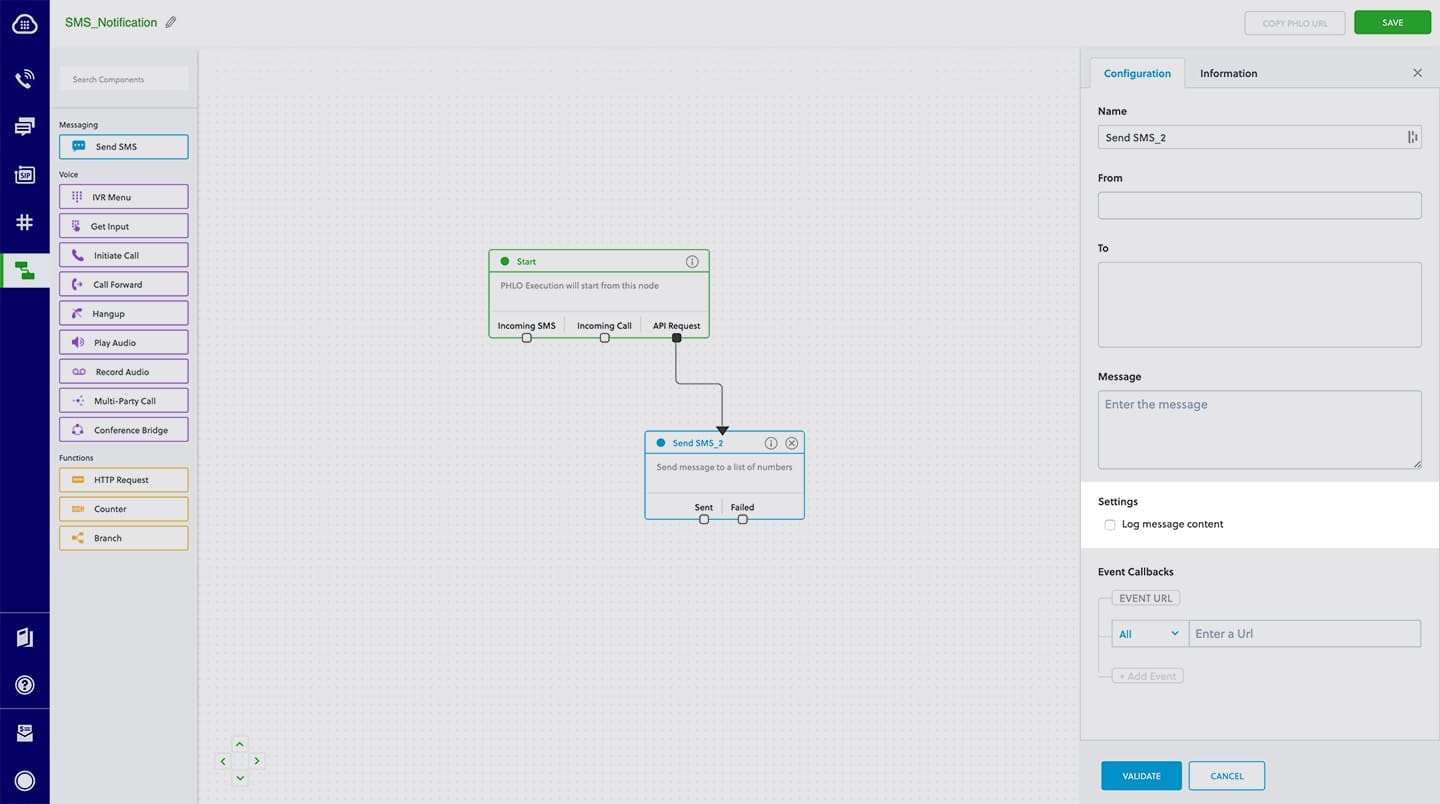
#### PHLO
## How to enable outbound SMS and MMS redaction
Plivo offers a simple way to redact the content and destination number of an outbound SMS or MMS message. Set the log request parameter of the [Send SMS API](/messaging/api/message#send-a-message) request to `false`. The default value is `true`: outbound messages are not redacted unless the log request parameter is explicitly set to `false`.
We also support partial redaction of your messaging data. To enable partial redaction,
* set the log request parameter of the Send SMS API request to content\_only to log message content and redact the phone numbers; or,
* set the log request parameter of the Send SMS API request to number\_only to log phone number data and redact the message content.
Please note that if the redaction is enabled, Plivo cannot debug or recover the message content if there are any issues.
#### Code samples
```py Python theme={null}
import plivo
client = plivo.RestClient('', '')
response = client.messages.create(
src ='14092102231', # Sender's phone number with country code
dst ='19177220741', # Receiver's phone Number with country code
text ='hello, test message!',
log = False)
print(response)
# print str(resp)
```
```Ruby Ruby theme={null}
require "plivo"
include Plivo
api = RestClient.new("", "")
response = api.messages.create(
src:"",
dst:"",
text:"Hello, this is a sample text",
url: "https://.com/sms_status/",
log:false
)
puts response
```
```Node.js Node.js theme={null}
// Example for Message create
var plivo = require('plivo');
(function main() {
'use strict';
// If auth id and auth token are not specified, Plivo will fetch them from the environment variables.
var client = new plivo.Client("", "");
client.messages.create({
src: "14092102231",
dst: "19177220741",
text: "hello, test message!",
log: 'false'
}).then(function(response) {
console.log(response);
}, function(err) {
console.error(err);
});
})();
```
```PHP PHP theme={null}
","");
try {
$response = $client->messages->create(
[
"src" => "+12025550000",
"dst" => "+12025551111",
"text" =>"Hello, this is a sample text",
"url"=>"https://.com/sms_status/",
"log"=> "false"
]
);
print_r($response);
}
catch (PlivoRestException $ex) {
print_r($ex);
}
```
```Java Java theme={null}
package com.plivo.api.samples.message;
import java.io.IOException;
import java.util.Collections;
import com.plivo.api.Plivo;
import com.plivo.api.exceptions.PlivoRestException;
import com.plivo.api.models.message.Message;
import com.plivo.api.models.message.MessageCreateResponse;
/**
* Example for Message create
*/
class Example {
public static void main(String [] args) {
Plivo.init("","");
try {
MessageCreateResponse response = Message.creator("14092102231", Collections.singletonList("19177220741"), "hello, test message!" ).log(false)
.create();
System.out.println(response);
} catch (PlivoRestException | IOException e) {
e.printStackTrace();
}
}
}
```
```Go Go theme={null}
// Example for Message create
package main
import (
"fmt"
"github.com/plivo/plivo-go/v7"
)
func main() {
client, err := plivo.NewClient("", "", &plivo.ClientOptions{})
if err != nil {
fmt.Print("Error", err.Error())
return
}
response, err := client.Messages.Create(
plivo.MessageCreateParams{
Src: "14092102231",
Dst: "19177220741",
Text: "hello, test message!",
Log: "false",
},
)
if err != nil {
fmt.Print("Error", err.Error())
return
}
fmt.Printf("Response: %#v\n", response)
}
```
```.NET .NET theme={null}
using System;
using System.Collections.Generic;
using Plivo;
using Plivo.Exception;
namespace Send_Sms
{
class Program
{
public static void Main(string[] args)
{
var api = new PlivoApi("","");
try
{
var response = api.Message.Create(
src: "14092102231",
dst: new List { "19177220741" },
text: "hello, test message!",
log: false
);
Console.WriteLine(response);
}
catch (PlivoRestException e)
{
Console.WriteLine("Exception: " + e.Message);
}
}
}
}
```
```sh Curl theme={null}
curl -i --user : \
-H "Content-Type: application/json" \
-d '{"src": "14092102231","dst": "19177220741", "text": "hello, test message!", "log": "false"}' \
https://api.plivo.com/v1/Account/{AUTH_ID}/Message/
```
#### PHLO
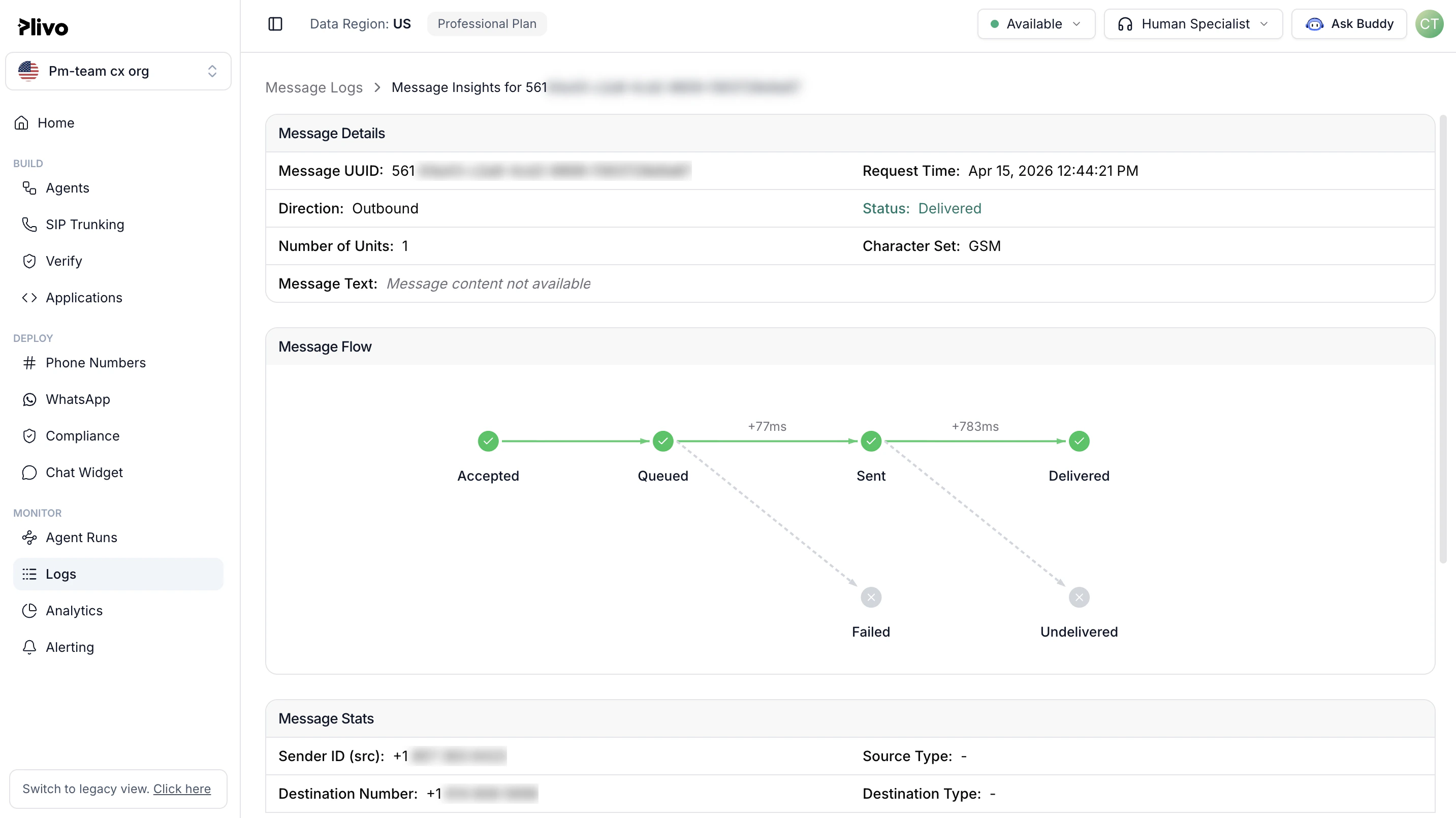
 ## Inbound SMS redaction
When inbound SMS message redaction is enabled:
* The last three digits of the originating number are redacted (replaced with \*\*\*).
* The actual message content is redacted and replaced with \*\*\*Text Content Redacted\*\*\*.
* Redaction is applied on
* Server logs
* Console debug logs
* Console debug UI
#### Console logs UI
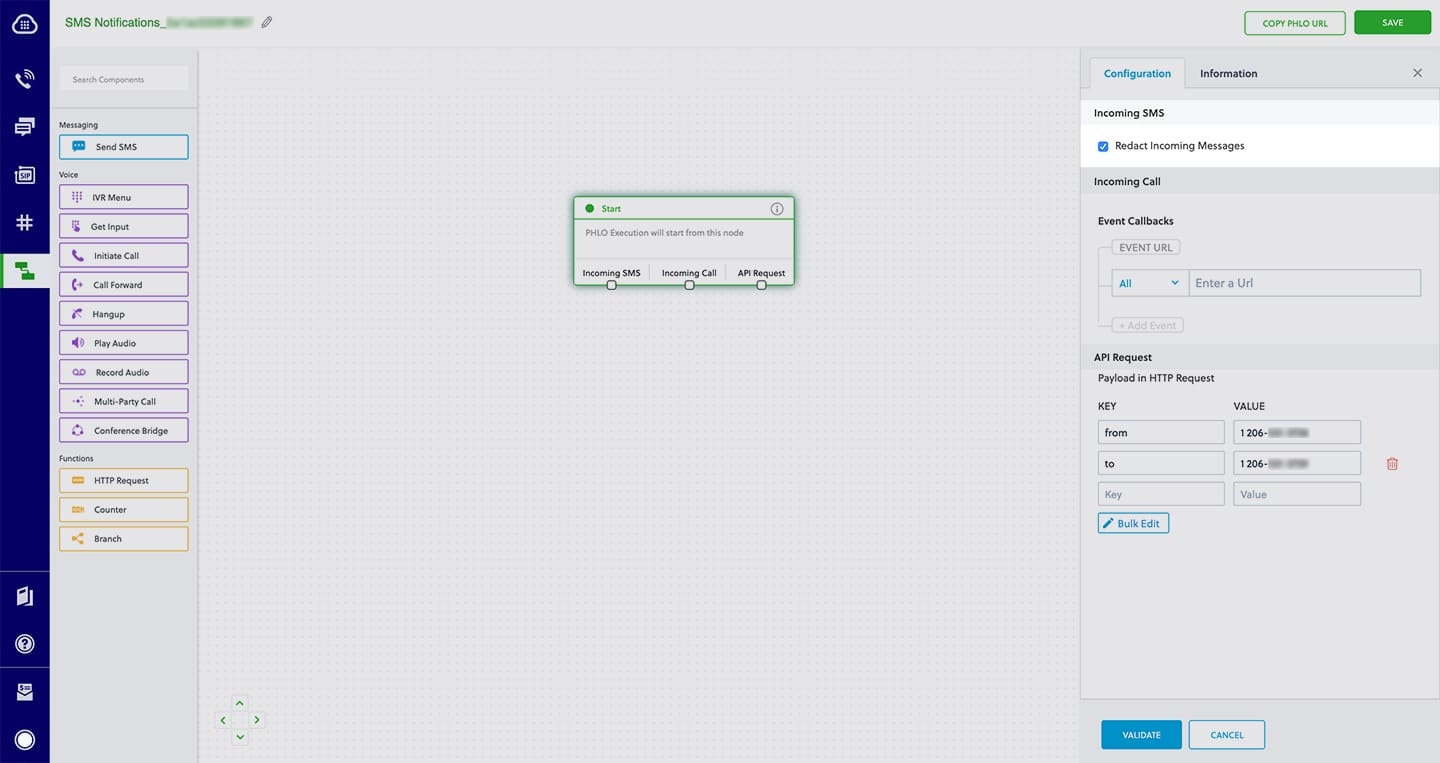
## Inbound SMS redaction
When inbound SMS message redaction is enabled:
* The last three digits of the originating number are redacted (replaced with \*\*\*).
* The actual message content is redacted and replaced with \*\*\*Text Content Redacted\*\*\*.
* Redaction is applied on
* Server logs
* Console debug logs
* Console debug UI
#### Console logs UI
 ## Inbound MMS redaction
When inbound message redaction is enabled:
* The source number is redacted in logs and in the Message Detail Record (MDR).
* Hyperlinks for attached media are logged anywhere on Plivo server logs, including callback logs.
* Media subresources for the received media are created and will remain accessible. They may be deleted by explicitly invoking the Delete Media API to delete the media files hosted on Plivo servers.
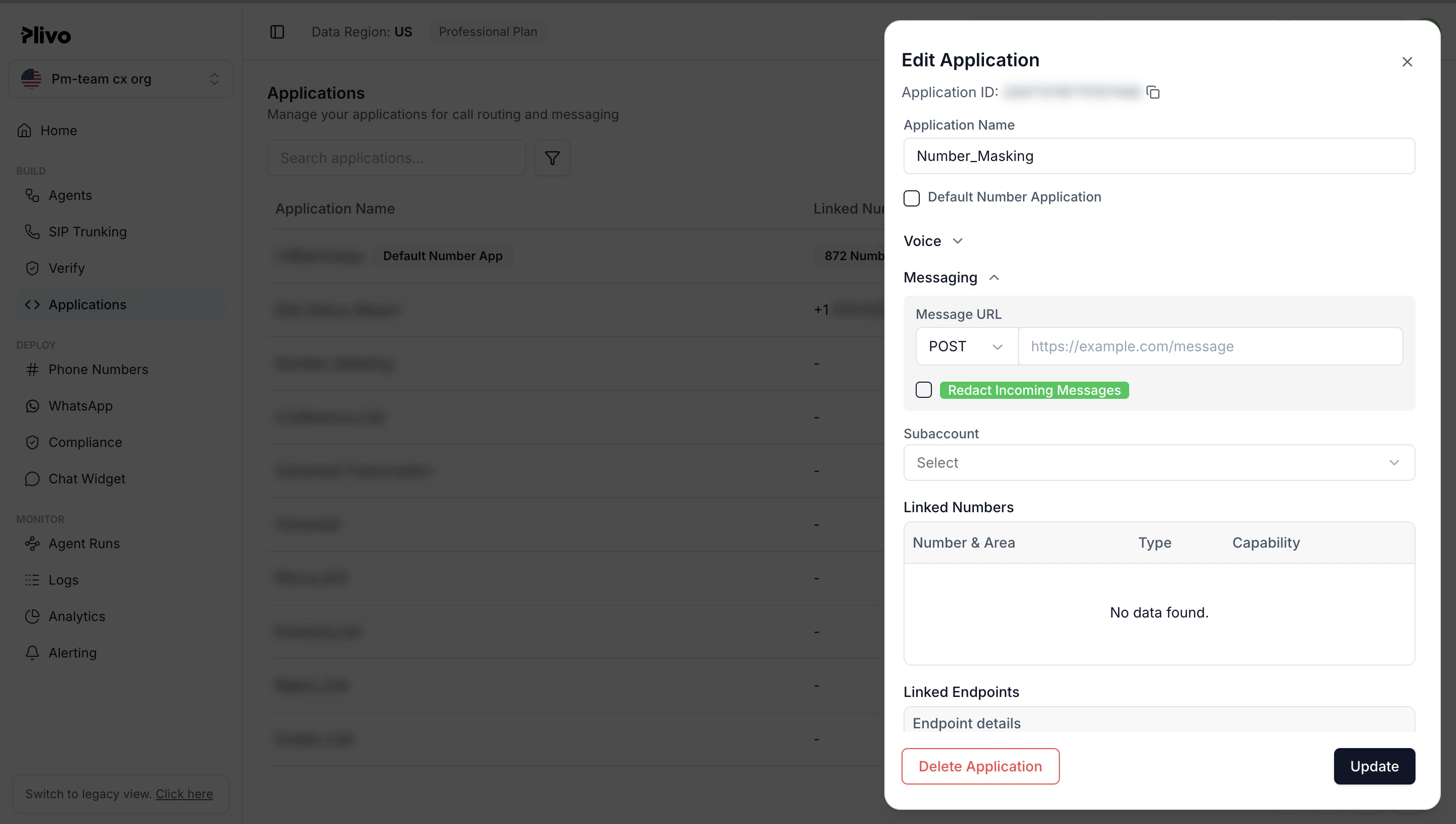
## How to enable inbound SMS and MMS redaction
You can control inbound SMS and MMS redaction at the application level.
Setting the application-level flag **log\_incoming\_messages** to
`false` enables redaction. The default value is
`true`, so inbound messages are not redacted unless the flag is explicitly set to
`false`. The **text** and **from\_number** fields are redacted when redaction is enabled.
When message redaction is enabled for an application, incoming messages to Plivo phone numbers associated with the application are redacted.
**Note:** If inbound messages are redacted, Plivo cannot debug or recover message content if there are any issues with the callback URL.
#### Code samples
```py Python theme={null}
import plivo
client = plivo.RestClient('','')
response = client.applications.create(
app_name='Test Application',
answer_url='https://answer.url', log_incoming_messages= False)
print(response)
```
```Ruby Ruby theme={null}
#
# Example for Application Create
#
require 'rubygems'
require 'plivo'
include Plivo
include Plivo::Exceptions
api = RestClient.new("","")
begin
response = api.applications.create(
'Test Application',
answer_url: 'https://answer.url',
answer_method: 'GET',
log_incoming_messages: false
)
puts response
rescue PlivoRESTError => e
puts 'Exception: ' + e.message
end
```
```Node.js Node.js theme={null}
// Example for Application create
var plivo = require('plivo');
(function main() {
'use strict';
// If auth id and auth token are not specified, Plivo will fetch them from the environment variables.
var client = new plivo.Client("","");
client.applications.create(
"Test Application", // app name
{
answerUrl: "https://answer.url", // answer url
logIncomingMessages: "false"
}
).then(function (response) {
console.log(response);
}, function (err) {
console.error(err);
});
})();
```
```PHP PHP theme={null}
","");
try {
$response = $client->applications->create(
'Test Application',
[
'answer_url' => 'https://answer.url',
'answer_method' => 'POST',
'log_incoming_messages' => 'false'
]
);
print_r($response);
}
catch (PlivoRestException $ex) {
print_r($ex);
}
```
```Java Java theme={null}
package com.plivo.api.samples.application;
import java.io.IOException;
import com.plivo.api.Plivo;
import com.plivo.api.exceptions.PlivoRestException;
import com.plivo.api.models.application.Application;
import com.plivo.api.models.application.ApplicationCreateResponse;
/**
* Example for Message create
*/
class Example {
public static void main(String [] args) {
Plivo.init("","");
try {
ApplicationCreateResponse response = Application.creator("Test Application").answerUrl("https://answer.url").logIncomingMessages(false)
.create();
System.out.println(response);
} catch (PlivoRestException | IOException e) {
e.printStackTrace();
}
}
}
```
```Go Go theme={null}
// Example for Application create
package main
import (
"fmt"
"github.com/plivo/plivo-go/v7"
)
func main() {
client, err := plivo.NewClient("", "", &plivo.ClientOptions{})
if err != nil {
fmt.Print("Error", err.Error())
return
}
response, err := client.Applications.Create(
plivo.ApplicationCreateParams{
AppName: "Test Application",
AnswerURL: "https://answer.url",
LogIncomingMessages: false,
},
)
if err != nil {
fmt.Print("Error", err.Error())
return
}
fmt.Printf("Response: %#v\n", response)
}
```
```cs .NET theme={null}
using System;
using System.Collections.Generic;
using Plivo;
using Plivo.Exception;
namespace apps
{
class Program
{
public static void Main(string[] args)
{
var api = new PlivoApi("","");
try
{
var response = api.Application.Create(
appName: "Test Application",
answerUrl: "https://answer.url",
logIncomingMessages: false
);
Console.WriteLine(response);
}
catch (PlivoRestException e)
{
Console.WriteLine("Exception: " + e.Message);
}
}
}
}
```
```sh Curl theme={null}
curl -i --user : \
-H "Content-Type: application/json" \
-d '{"answer_url": "https://.com", "app_name": "Test Application", "log_incoming_messages": "false"}' \
https://api.plivo.com/v1/Account/{AUTH_ID}/Application/
```
#### Console UI
## Inbound MMS redaction
When inbound message redaction is enabled:
* The source number is redacted in logs and in the Message Detail Record (MDR).
* Hyperlinks for attached media are logged anywhere on Plivo server logs, including callback logs.
* Media subresources for the received media are created and will remain accessible. They may be deleted by explicitly invoking the Delete Media API to delete the media files hosted on Plivo servers.
## How to enable inbound SMS and MMS redaction
You can control inbound SMS and MMS redaction at the application level.
Setting the application-level flag **log\_incoming\_messages** to
`false` enables redaction. The default value is
`true`, so inbound messages are not redacted unless the flag is explicitly set to
`false`. The **text** and **from\_number** fields are redacted when redaction is enabled.
When message redaction is enabled for an application, incoming messages to Plivo phone numbers associated with the application are redacted.
**Note:** If inbound messages are redacted, Plivo cannot debug or recover message content if there are any issues with the callback URL.
#### Code samples
```py Python theme={null}
import plivo
client = plivo.RestClient('','')
response = client.applications.create(
app_name='Test Application',
answer_url='https://answer.url', log_incoming_messages= False)
print(response)
```
```Ruby Ruby theme={null}
#
# Example for Application Create
#
require 'rubygems'
require 'plivo'
include Plivo
include Plivo::Exceptions
api = RestClient.new("","")
begin
response = api.applications.create(
'Test Application',
answer_url: 'https://answer.url',
answer_method: 'GET',
log_incoming_messages: false
)
puts response
rescue PlivoRESTError => e
puts 'Exception: ' + e.message
end
```
```Node.js Node.js theme={null}
// Example for Application create
var plivo = require('plivo');
(function main() {
'use strict';
// If auth id and auth token are not specified, Plivo will fetch them from the environment variables.
var client = new plivo.Client("","");
client.applications.create(
"Test Application", // app name
{
answerUrl: "https://answer.url", // answer url
logIncomingMessages: "false"
}
).then(function (response) {
console.log(response);
}, function (err) {
console.error(err);
});
})();
```
```PHP PHP theme={null}
","");
try {
$response = $client->applications->create(
'Test Application',
[
'answer_url' => 'https://answer.url',
'answer_method' => 'POST',
'log_incoming_messages' => 'false'
]
);
print_r($response);
}
catch (PlivoRestException $ex) {
print_r($ex);
}
```
```Java Java theme={null}
package com.plivo.api.samples.application;
import java.io.IOException;
import com.plivo.api.Plivo;
import com.plivo.api.exceptions.PlivoRestException;
import com.plivo.api.models.application.Application;
import com.plivo.api.models.application.ApplicationCreateResponse;
/**
* Example for Message create
*/
class Example {
public static void main(String [] args) {
Plivo.init("","");
try {
ApplicationCreateResponse response = Application.creator("Test Application").answerUrl("https://answer.url").logIncomingMessages(false)
.create();
System.out.println(response);
} catch (PlivoRestException | IOException e) {
e.printStackTrace();
}
}
}
```
```Go Go theme={null}
// Example for Application create
package main
import (
"fmt"
"github.com/plivo/plivo-go/v7"
)
func main() {
client, err := plivo.NewClient("", "", &plivo.ClientOptions{})
if err != nil {
fmt.Print("Error", err.Error())
return
}
response, err := client.Applications.Create(
plivo.ApplicationCreateParams{
AppName: "Test Application",
AnswerURL: "https://answer.url",
LogIncomingMessages: false,
},
)
if err != nil {
fmt.Print("Error", err.Error())
return
}
fmt.Printf("Response: %#v\n", response)
}
```
```cs .NET theme={null}
using System;
using System.Collections.Generic;
using Plivo;
using Plivo.Exception;
namespace apps
{
class Program
{
public static void Main(string[] args)
{
var api = new PlivoApi("","");
try
{
var response = api.Application.Create(
appName: "Test Application",
answerUrl: "https://answer.url",
logIncomingMessages: false
);
Console.WriteLine(response);
}
catch (PlivoRestException e)
{
Console.WriteLine("Exception: " + e.Message);
}
}
}
}
```
```sh Curl theme={null}
curl -i --user : \
-H "Content-Type: application/json" \
-d '{"answer_url": "https://.com", "app_name": "Test Application", "log_incoming_messages": "false"}' \
https://api.plivo.com/v1/Account/{AUTH_ID}/Application/
```
#### Console UI
 #### PHLO